Usage
Blueprint Workflow Examples
Pseudocode showing typical Blueprint node flows. Nodes call the same operations as C++.
// Blueprint: Save a counter to a slot (PGXDemo flow)

PGX Save
  SaveContext(
    ContextTag: "PGX.Save.Context.Demo",
    SlotName:   "DemoSlot"
  )
  GetSaveGame(
    DomainTag: "PGX.Save.Domain.Progress"
  ) → Data
  QuickSave(
    ContextTag: "PGX.Save.Context.Demo"
  )
  DoesSlotExist(
    ContextTag: "PGX.Save.Context.Demo",
    SlotName:   "DemoSlot"
  ) → bool

// Data values are written in C++ (WriteInt). Nodes read them back.
// Blueprint: Play background music + sound effect

PGX Audio | Playback
  PlayMusic(
    Music:  MusicAsset,
    FadeIn: 2.0
  )

  PlaySound2D(
    Sound:  ConfirmSound,
    Params: MakeParams
  )

PGX Audio | Volume
  SetChannelVolume(
    ChannelTag: "PGX.Audio.Channel.Music",
    Volume:     0.7
  )

  GetChannelVolume(
    ChannelTag: "PGX.Audio.Channel.SFX"
  ) → float CurrentVolume
// Blueprint: Execute an event, register a handler

PGX EventHandler
  QuickExecute(
    EventTag: "PGX.Event.Ability.Cast"
  ) → EPGXEventResult

PGX EventHandler | Advanced
  RegisterHandler(
    EventTag:     "PGX.Event.Ability.Cast",
    HandlerClass: MyHandler,
    Lifecycle:    Cached
  )

// Query: CanExecuteEvent, IsEventRegistered
Save System
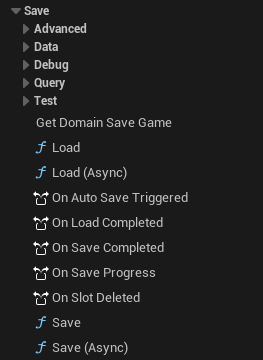
PGX|Save — The Convention in Practice
The 4-level pattern above isn’t theory. Here it is in the actual editor: Data, Data|Read, Data|Write, Query, Advanced, Debug — organized so you find the right node without scrolling a flat list.
Sub-categories · Zero ambiguity
EventHandler
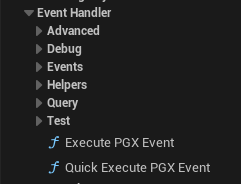
PGX|EventHandler — Same Pattern, Every System
Fire events, register handlers, query execution history. The same Core/Query/Advanced/Debug pattern you already know from Save. Learn one, know them all.
Consistent convention · Predictable discovery