v0.1.1 — Development Preview · UE 5.7.4

PGX Core

Modular C++ framework for Unreal Engine 5. 26 plugins, star topology architecture, and editor tooling.

Framework at a Glance

0
Plugins
0
Modules
0
Runtime Modules
0
Editor Modules
0
Editor Build Actions
0
Game Build Actions

As of v0.1.1 (UE 5.7.4, Development Preview) — Windows Development targets, plus 2 UncookedOnly and 1 DeveloperTool module.

Star Topology

CORE Profile Log Save GameFlow PSO LevelFlow Loading MGOS Audio Registry Construction Message EventHandler

One Core, Zero Coupling

PGX enforces a strict star topology: every L2 plugin depends exclusively on PGXCoreRuntime. No L2-to-L2 runtime dependencies — ever.

Cross-plugin communication happens through two dedicated buses: UPGXMessageSubsystem (pub/sub) and UPGXEventHandlerSubsystem (behavior resolution).

This architecture guarantees that any plugin can be added or removed without breaking the rest of the framework.

Zero L2 runtime edges in v0.1.1. Documented exceptions go through an explicit validator allow-list — currently empty. Editor aggregation tools (Hub, SimHarness) are the only cross-plugin links. At runtime, systems coordinate on Core message buses.
See all diagrams →

Core Subsystems

Each subsystem ships with types, delegates, config data assets, tags, console commands, a Blueprint library, an inspector, and documentation. Maturity varies by plugin — see the maturity matrix.

Profile

v2.0
  • Platform-aware budgets
  • Subsystems enforce limits
UPGXPlatformConfig DA → Budget structs

Log

v3.0
  • Polymorphic observability
  • 6-phase rewrite
LogPGX{System} per-module categories

Save

v1.0
  • Domain-based save slots
  • Checksum + async migration
SaveContext → EPGXSaveResult

GameFlow

v1.0
  • State machine + history
  • Batch transitions + revert
SetStateByTag → FPGXFlowResult

PSO

v2.0
  • Pipeline State precaching
  • Pause/resume contexts
RequestPSOWarmUp → bool

LevelFlow

v1.0
  • Level transitions + sublevels
  • Cancel + resolve support
RequestLevelTransition → Result

Loading

v1.0
  • Loading screen orchestration
  • Progress + skip + force close
RequestLoading → Result

MGOS

v1.0
  • GC observability engine-wide
  • Profile + history metrics
UEngineSubsystem — GC snapshots

Audio

v1.1
  • Dual-backend subsystem
  • DataAssets, full API set
PlaySound2D | PlayMusic | Dialogue

Data Registry

v2.0
  • DataTable-first architecture
  • Cache + compiled wiring
FindRegistryEntry → Entry

Construction

v1.3
  • DataAsset types
  • Class override pattern
DA slot → Default | CppClass | Blueprint

Message

v1.0
  • Pub/sub message bus
  • FInstancedStruct payloads
Broadcast PGX Message → OnMessage

EventHandler

v1.0
  • Behavior resolution bus
  • Sequence + telemetry
QuickExecute → EPGXEventResult
Central Hub

Every System, One Dashboard

Every system above lives inside the Hub Dashboard. Version, health status, and KPI chips — at a glance. One click opens any inspector.

No terminal, no file browsing. Everything you need to manage PGX systems is already in the editor.

System cards · Real-time KPIs · One-click inspectors
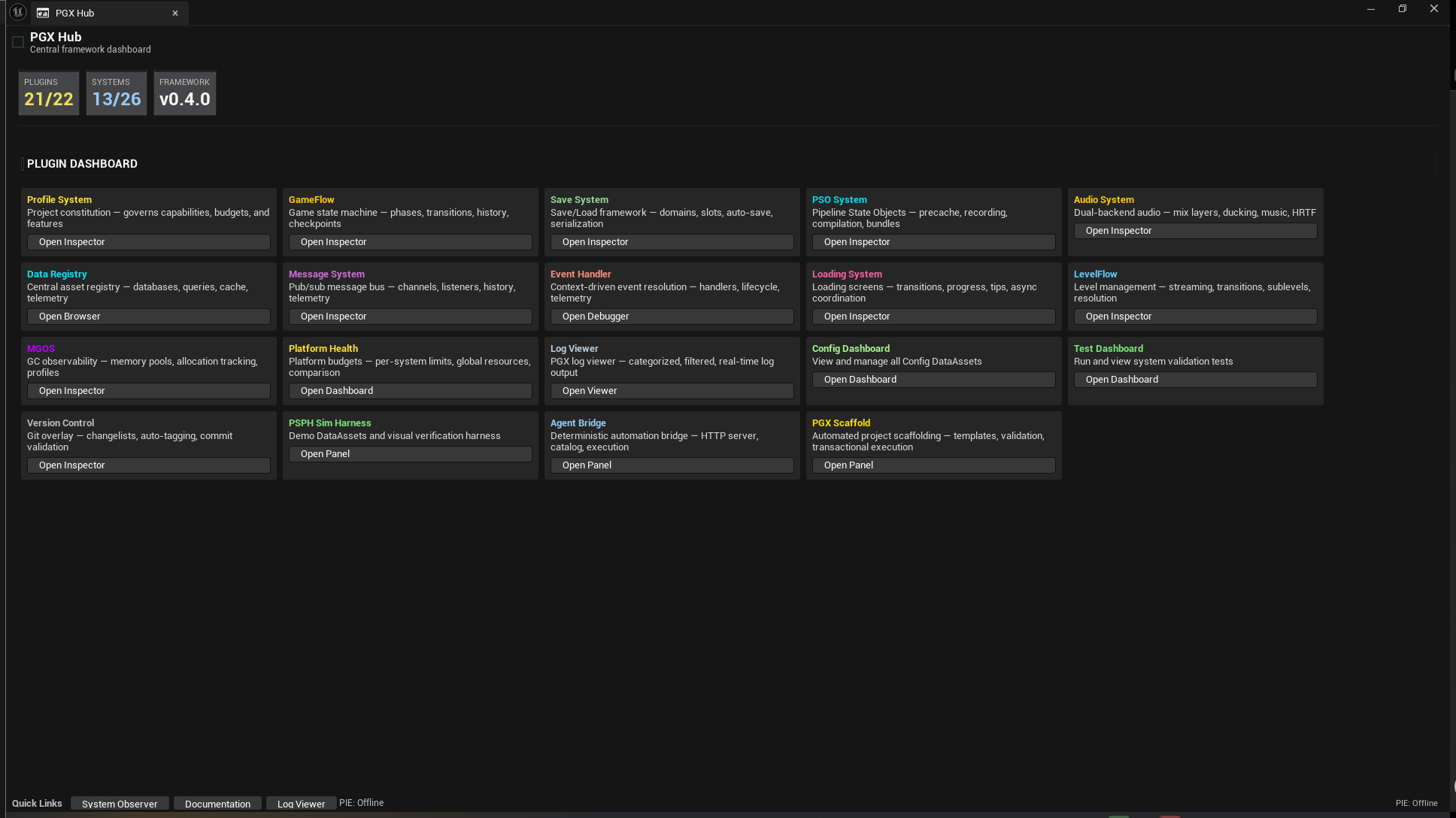
PGX Hub Dashboard
Live in Editor
PGX Hub Dashboard — system cards with version, KPI chips, and health status

Hub screenshot from an internal development build. Counters predate the v0.1.1 snapshot.
Clean, Predictable APIs

Every system follows the same patterns. Learn one, know them all.

// Save flow, adapted from PGXDemoGameMode.cpp (v0.1.1)
// Tags come from your project
UPGXSaveSubsystem* Save = GetGameInstance()->GetSubsystem<UPGXSaveSubsystem>();
if (UPGXSaveGame* Data = Save->GetSaveGame(Tag_Save_Progress)) {
  Data->WriteInt(TEXT("InteractionCount"), InteractionCount);
  Save->SaveContext(Tag_Save_Context, TEXT("DemoSlot"));
}

// Change GameFlow state (same source)
UPGXGameFlowSubsystem* Flow = GetGameInstance()->GetSubsystem<UPGXGameFlowSubsystem>();
FPGXFlowResult FlowResult = Flow->SetStateByTag(EPGXFlowChannel::Global, Tag_Flow_Interacted, this);

// Fire a resolvable event
UPGXEventHandlerBlueprintLibrary::QuickExecute(this, Tag_Ability_Cast);
// Blueprint nodes call the same operations as C++

PGX Save
  SaveContext(ContextTag, SlotName)
  GetSaveGame(DomainTag)
  QuickSave(ContextTag)
  DoesSlotExist(ContextTag, SlotName)

PGX Message
  Broadcast PGX Message(Channel, Message ← morphing pin, any struct)
  Listen for PGX Messages(Channel) → OnMessage
  GetPayload

PGX EventHandler
  QuickExecute(EventTag)
  RegisterHandler(EventTag, HandlerClass, Lifecycle)

PGX Audio
  PlaySound2D(Sound, Params)
  PlayMusic(Music, FadeIn)
  SetChannelVolume(ChannelTag, Volume)
Runtime Evidence

See What Your Code Does

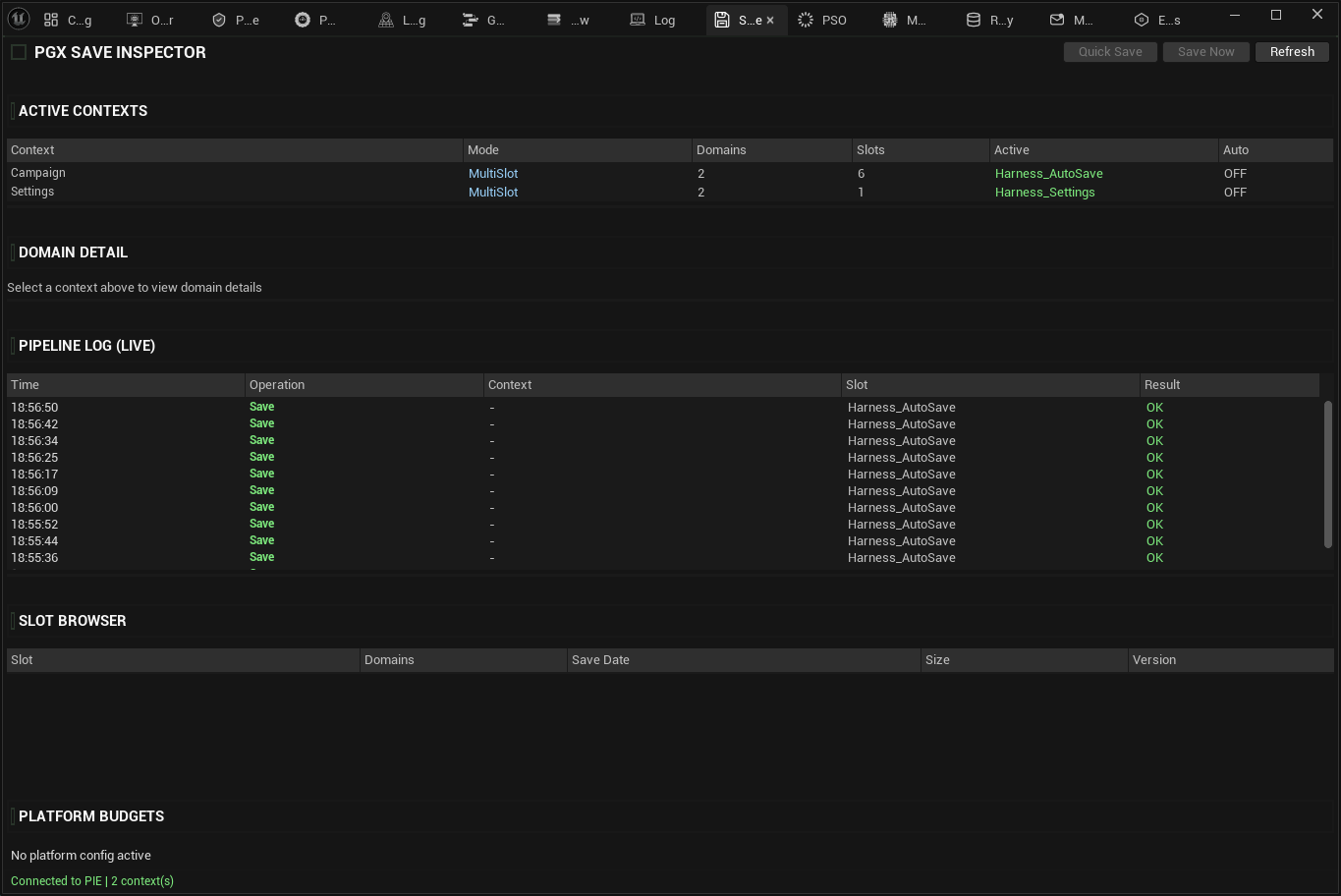
The code above creates save domains, broadcasts messages, and fires events. The Save Inspector shows you the result in real time: domains, keys, slot status, and pipeline logs.

Every subsystem has its own inspector. No guessing, no breakpoints needed.

Per-system inspectors · Live data
PGX Save Inspector
Runtime Inspection
Save Inspector — Domain contexts, pipeline log, and slot browser showing runtime state

Built for Developer Productivity

An editor integration with custom panels, visual construction, and one-click workflows.

PGXDocs

v1.1 — Native Slate Renderer

In-editor documentation with md4c parser. No WebBrowser dependency.

PGXSimHarness

Test Harness

Full-stack test harness. Demo mode + deep injection across subsystems.

PGXScaffold

Project Scaffolding

4 built-in templates. Source control + rollback. JSON audit trail.

PGXEditorTools

Hub + Dashboard

Central toolbar, Hub dashboard, system observer, test dashboard, settings.

PGXVersionControl

v1.0 — Git Integration

Source control utilities integrated into the editor workflow.

Observability

Real-Time System Observer

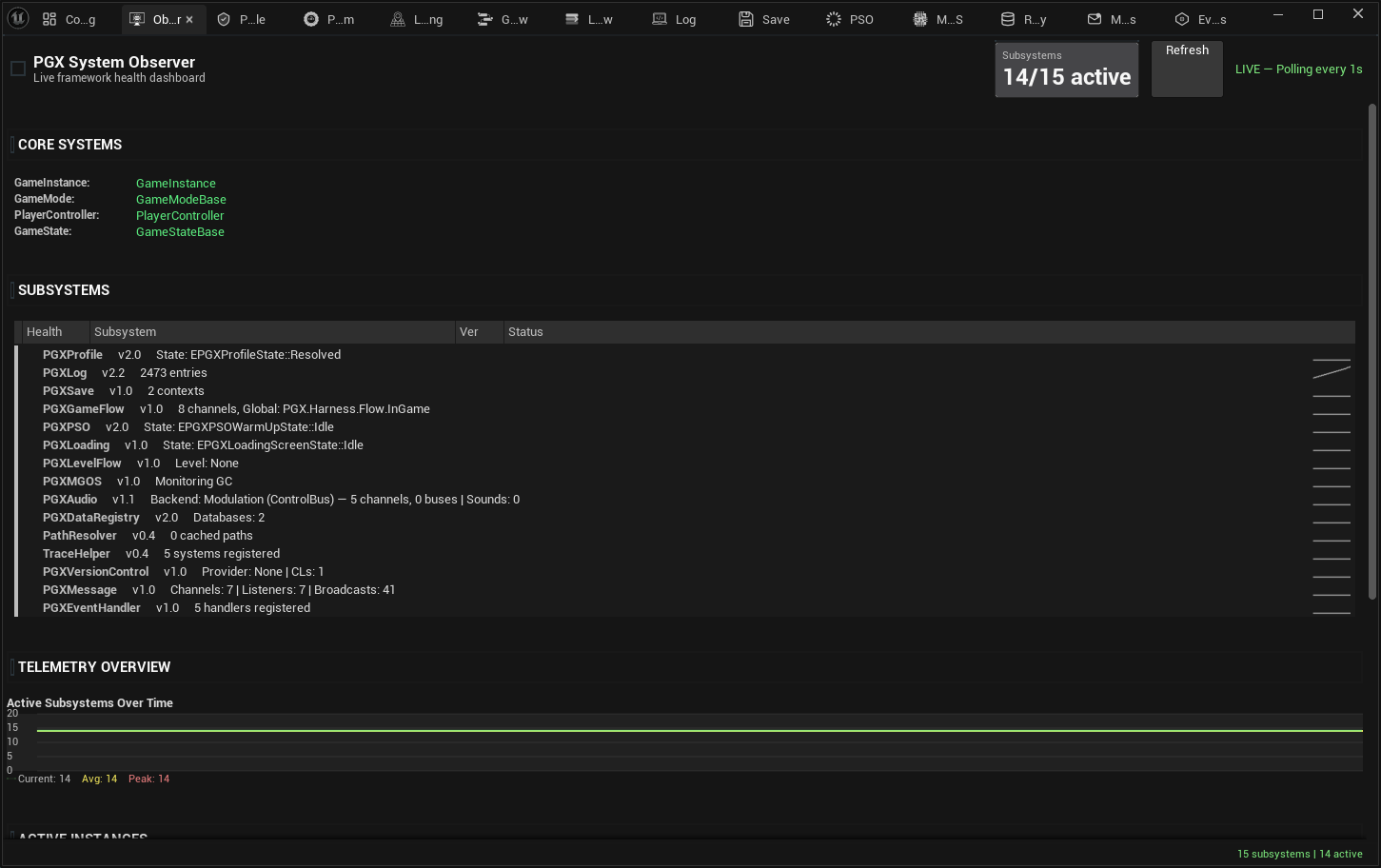
Sparklines, health dots, and live metrics for PGX subsystems. Built on the SlateIM graph engine with real-time polling. Spot bottlenecks before they become bugs.

Live sparklines · Health indicators
PGX System Observer
Live Monitoring
System Observer — Live subsystem monitoring with sparklines and health indicators